




검색, 필터, 정렬 기능은 선박 목록을 빠르게 조회할 수 있도록 도와줍니다. 사용자는 특정 조건이나 설정에 따라 선박을 빠르게 찾고, 보기 화면을 맞춤화하며, 워크스페이스 내 선박 정보를 체계적으로 관리할 수 있습니다.
검색, 필터, 정렬 기능은 선박 목록을 효율적으로 조회하고 관리할 수 있도록 돕는 도구입니다.
이 기능들을 활용하면 많은 수의 선박 데이터를 보다 직관적이고 효율적으로 다룰 수 있습니다.
검색 (Search)
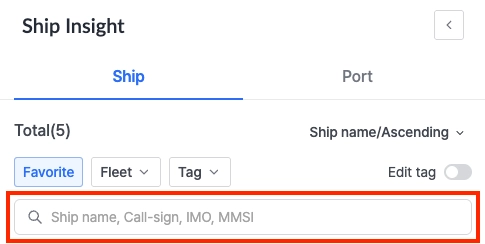
검색창을 사용하여 등록된 선박을 빠르게 찾을 수 있습니다.

아직 선박을 등록하지 않았다면? 등록 방법 보기
다음 중 하나의 식별 정보를 입력하여 검색할 수 있습니다:
•
선박명 (Ship Name)
•
콜사인 (Call Sign)
•
IMO 번호
•
MMSI 번호
필터 (Filter)
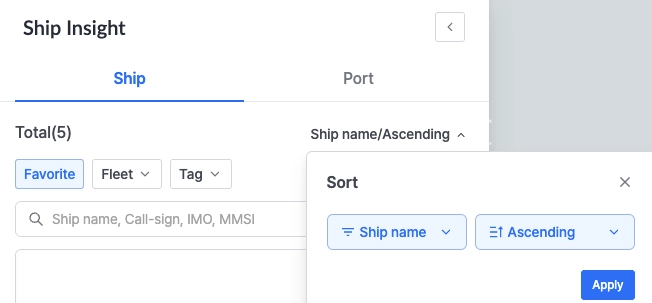
•
즐겨찾기 (Favorite): 즐겨찾기한 선박만 보기
◦
Favorite에는 현재 계정으로 등록한 선박이 포함됩니다. 그 외의 선박은 회사 워크스페이스에 등록된 전체 선박 리스트에서 확인할 수 있습니다.

선박은 등록 후 7일이 경과해야 즐겨찾기에서 삭제(등록 해제)할 수 있습니다.
데이터의 안정성과 추적 정확성을 보장하기 위한 제한입니다.
•
Fleet: 지정된 플릿 그룹 기준으로 선박을 필터링
•
Tag: 사용자 지정 태그를 기준으로 선박을 필터링

태그 관리: 태그 생성 및 적용 방법은 이 가이드를 참고하세요.
•
CII: 탄소효율등급(CII: A~E)을 기준으로 필터링
Sort
선박명(Ship Name) 기준으로 선박 리스트의 표시 순서를 정렬할 수 있습니다:
•
오름차순 Ascending (A → Z)
•
내림차순 Descending (Z → A)

선박 또는 항구 목록에서 선박 및 항구를 클릭하면 지도에서 해당 위치로 이동하며 상세 팝업이 표시됩니다. 이를 통해 선박 추적, 입출항 이력 확인 등을 확인할 수 있습니다.
The Search, Filter & Sort functions help users efficiently navigate large fleets by narrowing down the list of ships based on specific identifiers, attributes, or preferences.
These tools are essential for quickly locating vessels, customizing views, and managing ship data more effectively within your workspace.
Search
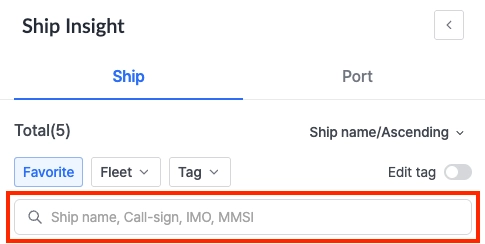
Use the search bar to quickly locate your registered ship.

Search using any of the following identifiers:
•
Ship Name
•
Call Sign
•
IMO Number
•
MMSI Number
Filter
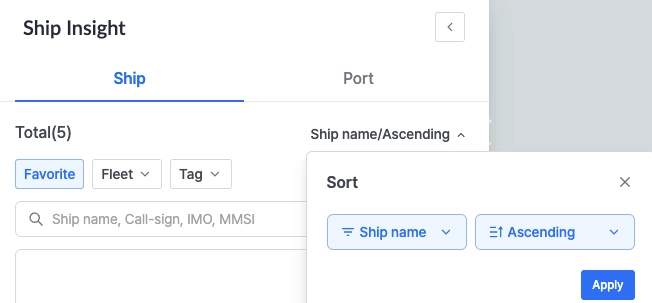
•
Favorite: View only ships marked as favorites.
◦
Favorite includes ships registered under the current account. All other ships within the company’s workspace are shown in the full ship list.
Ships can only be removed from Favorites (unregistered) 7 days after registration. This restriction ensures data integrity and stable tracking within your workspace.
•
Fleet: Filters ships based on the fleet group assigned.
•
Tag: Filters ships using applied custom tags.

For Tag Management: Click here to see the guide on how to create and apply tags.
•
CII: Filters ships by their Carbon Intensity Indicator (CII) rating (A to E).
Sort
Customize the ship list display by sorting based on Ship Name:
•
Ascending (A to Z)
•
Descending (Z to A)
Clicking on a ship or port from the list will move the map to its location and open a detailed pop-up. This allows users to track the vessel and view its port call history and related information.