



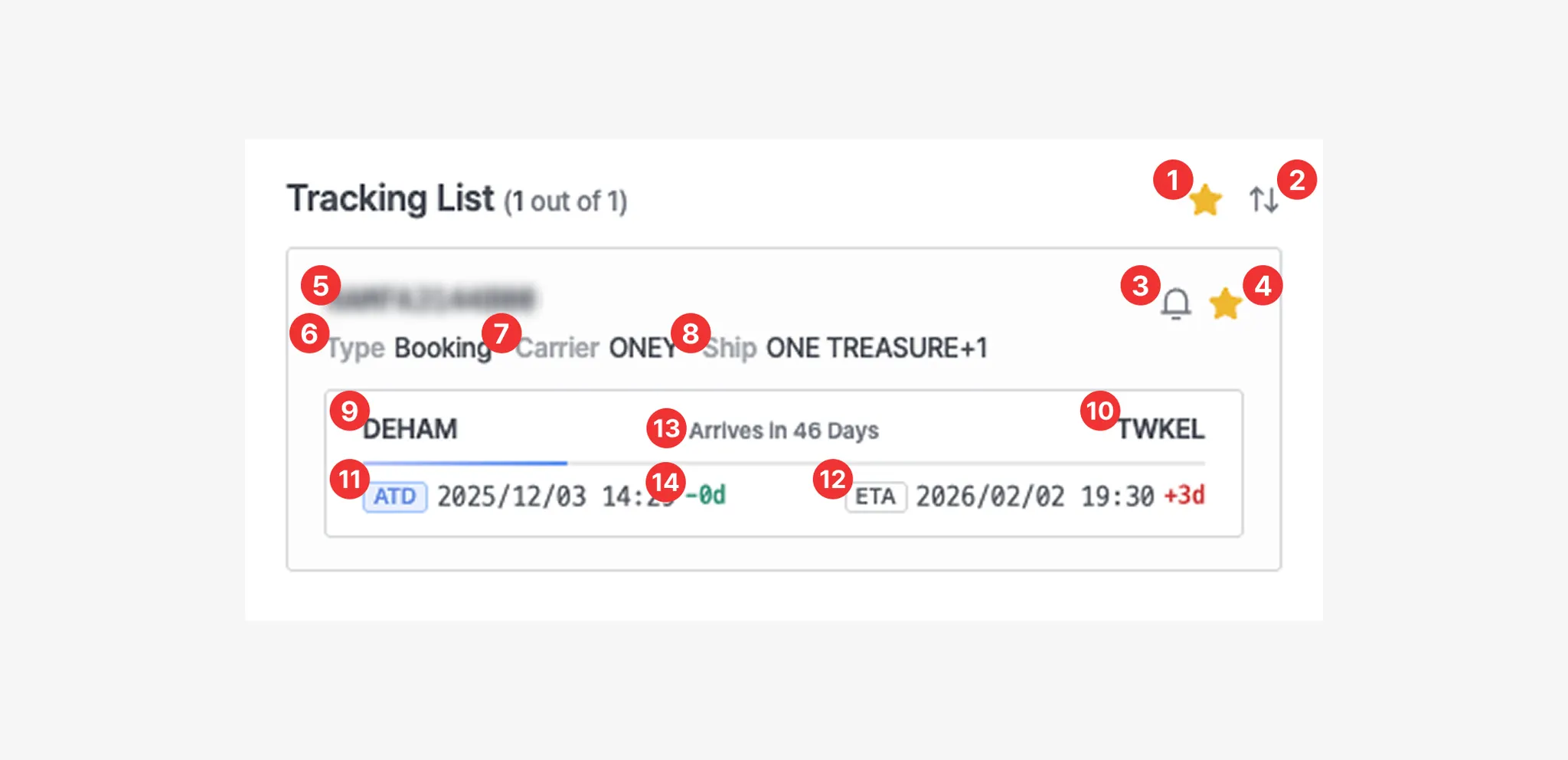
The Tracking List allows users to quickly review summary information for shipments they have registered.
Tracking List
No. | Description |
1 | View shipments marked as Favorites |
2 | Sort shipments by ETA |
3 | Enable or disable email notifications for shipment status changes |
4 | Add or remove the shipment from Favorites |
5 | Shipment number (one of M-B/L, Booking, or Container number) |
6 | Shipment identification type (M-B/L, Booking, or Container) |
7 | Carrier code |
8 | Vessel information associated with the shipment |
9 | Port of Loading (POL) |
10 | Port of Discharge (POD) |
11 | Estimated and actual departure dates
(ETD : Estimated Time of Departure / ATD : Actual Time of Departure) |
12 | Estimated and actual arrival dates
(ETA : Estimated Time of Arrival / ATA : Actual Time of Arrival) |
13 | Number of days remaining until arrival or number of delayed days |
14 | Schedule time difference between the shipment registration date and the current date |

Registered shipments can be deleted by right-clicking the shipment card and selecting the Delete option. Please note that deleted shipments are still counted toward the contracted usage volume.