



This guide describes the major changes from SVMP, including updated features, field name modifications, and API structure updates. It also provides step-by-step instructions for the technical tasks and testing procedures required for migration.
Improvements
1. UI/UX Enhancements
•
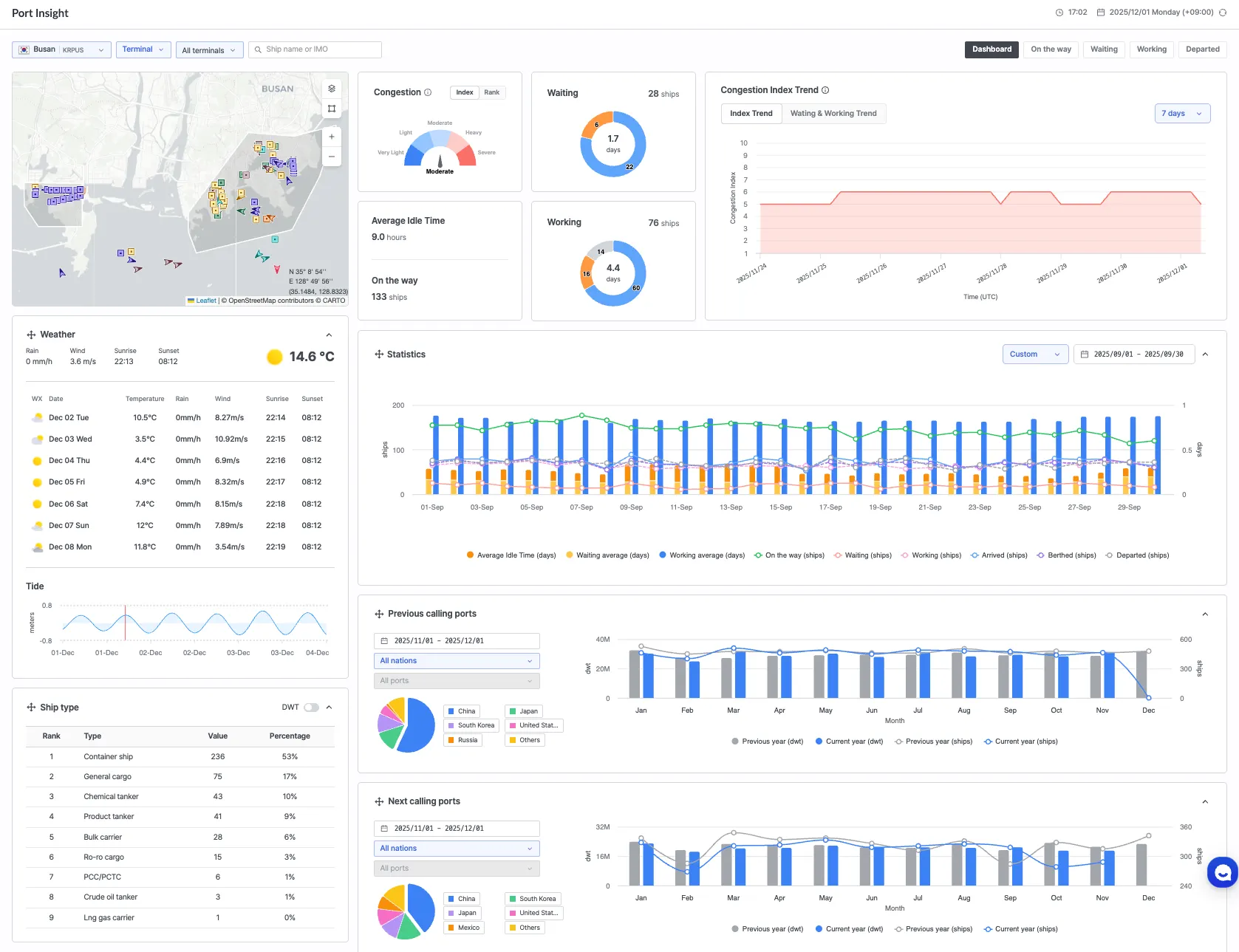
A Design System has been established, standardising all UI elements, including text and colour styles, and components. This has been applied to Port Insight.
2. Added Date Range Selection
•
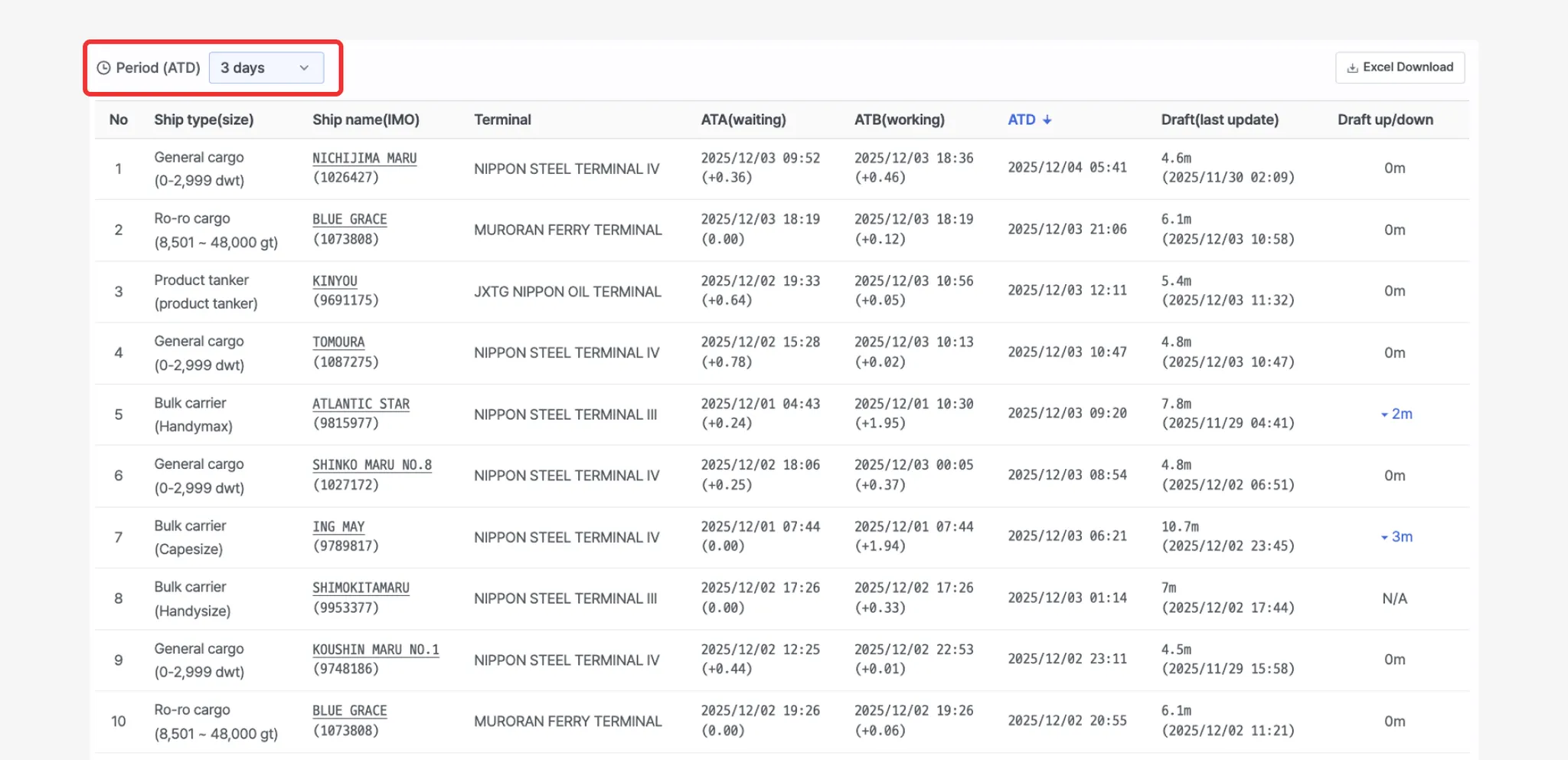
The Previous Departed Vessels list, which was limited to a fixed 3-day view, now supports user-defined date range selection.
3. New Congestion Index
•
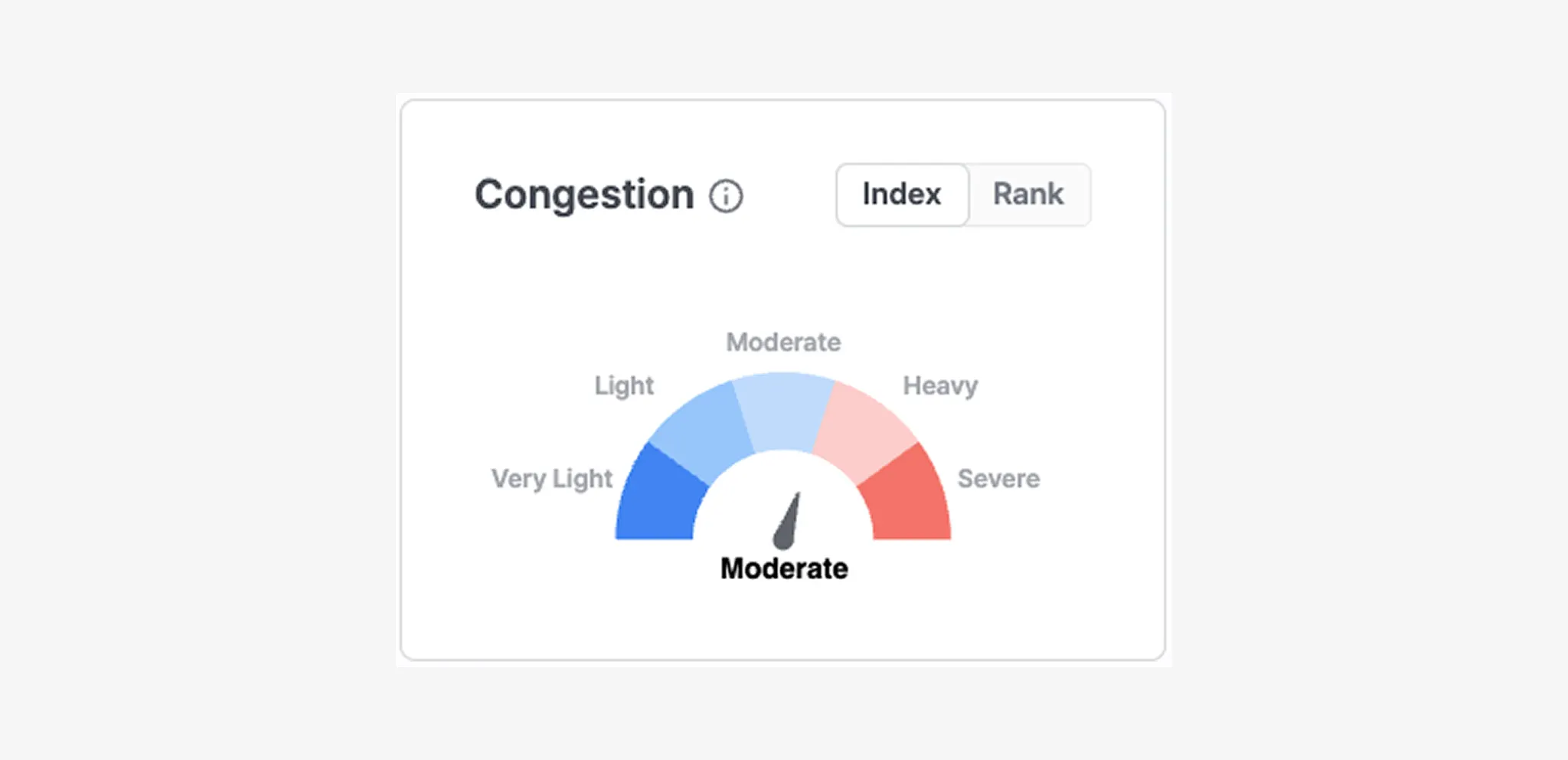
The previous version determined congestion using only the port ranking provided by Port Insight. The updated Congestion Index calculates congestion levels using multi-level historical congestion data for each port and expresses the result numerically. This provides more consistent and reliable congestion information.
•
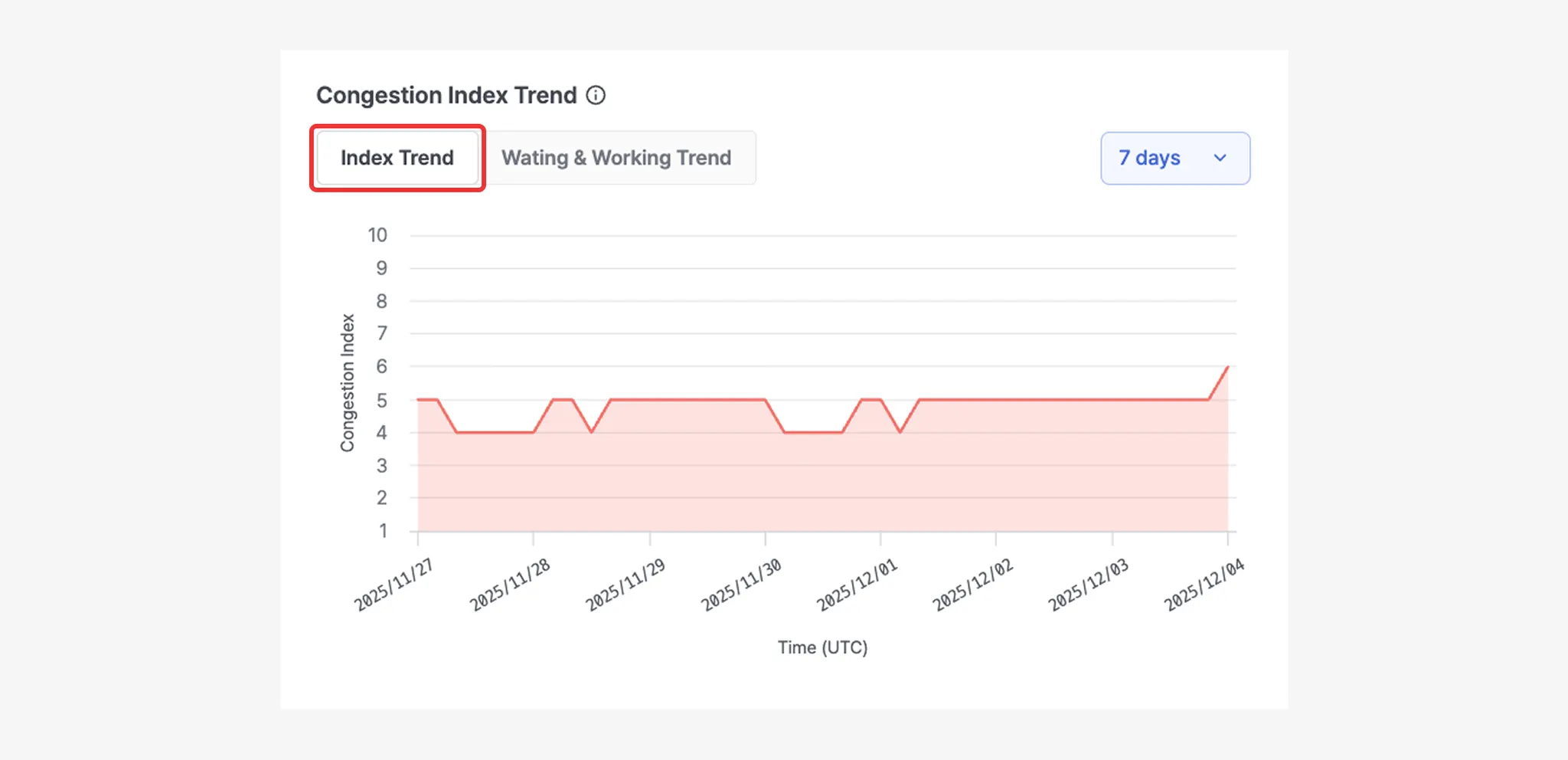
Index Trend: Congestion levels can now be viewed as a trend over a selected period, instead of only checking real-time values.
•
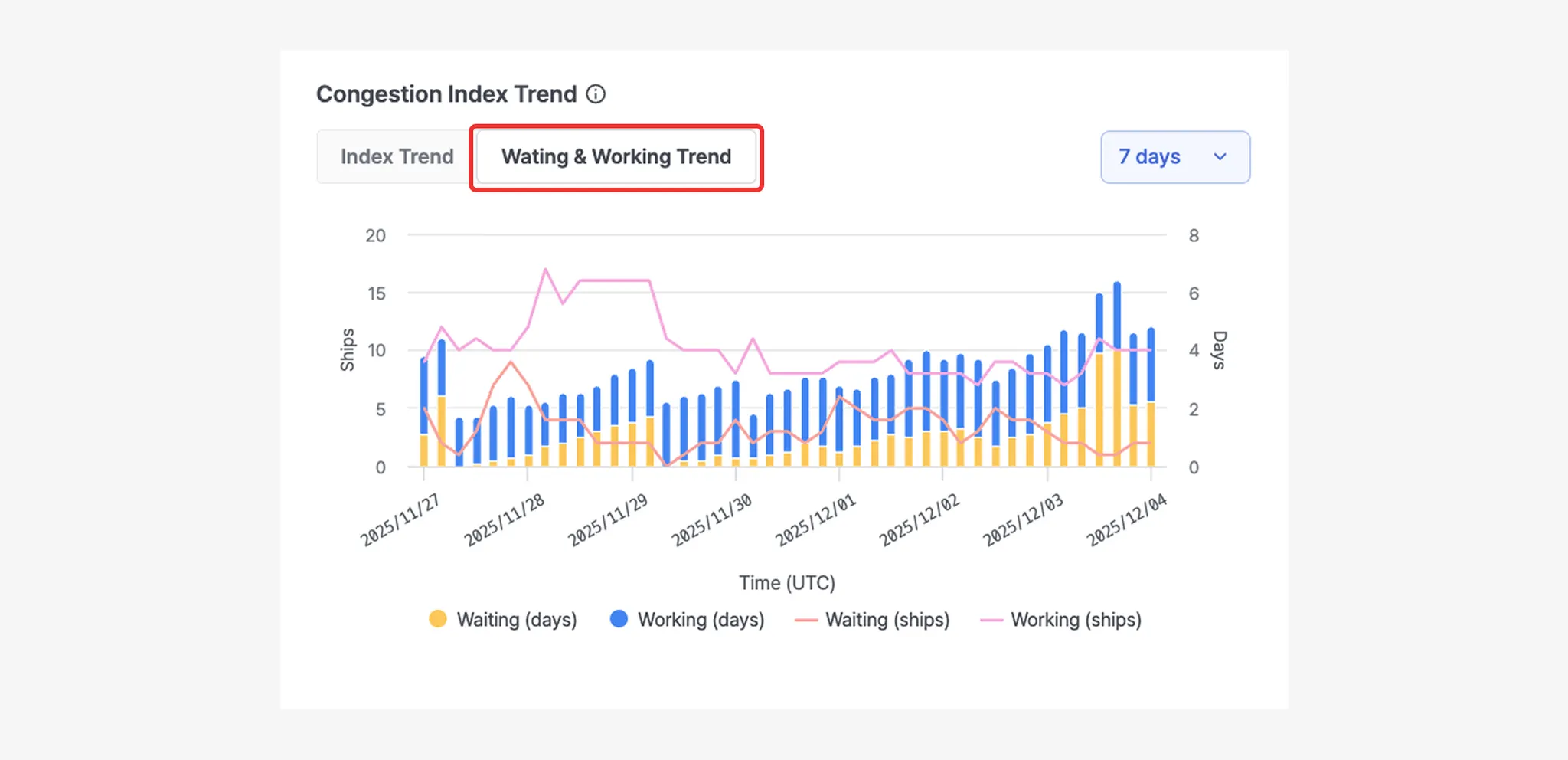
Waiting & Working Trend: Waiting and Working values recorded during congestion index generation are now shown as time-series data to help identify changes over time.
4. Performance Improvements
•
Overall system performance has been improved, resulting in reduced loading times.
Changes
1. API Endpoint Updates
•
Port Insight
◦
Vessel information and zone (area) information are now combined and sent to the Port Insight API as a single dataset.
API | SVMP | SeaVantage Insight |
[GET] /port-insight | https://svmp.seavantage.com/api/v1/portInsight | https://insight.seavantage.com/api/port-insight |
[GET] /port-insight/ships/history | https://svmp.seavantage.com/api/v1/portInsight | https://insight.seavantage.com/api/port-insight/ships/history |
[GET] /port-insight/current | https://svmp.seavantage.com/api/v1/portInsight | https://insight.seavantage.com/api/port-insight/ships/current |
•
Port Insight Next Calling
API | SVMP | SeaVantage Insight |
[GET] /port-insight/next-calling/terminals | https://svmp.seavantage.com/api/v1/portInsight/statistic/nextCalling/pie | https://insight.seavantage.com/api/port-insight/next-calling/terminals |
[GET] /port-insight/next-calling/ship-type-sizes | https://svmp.seavantage.com/api/v1/portInsightShipType/statistic/nextCalling/pie | https://insight.seavantage.com/api/port-insight/next-calling/ship-type-sizes |
[GET] /port-insight/next-calling/monthly/terminals | https://svmp.seavantage.com/api/v1/portInsight/statistic/nextCalling/bar | https://insight.seavantage.com/api/port-insight/next-calling/monthly/terminals |
[GET] /port-insight/next-calling/monthly/ship-type-sizes | https://svmp.seavantage.com/api/v1/portInsightShipType/statistic/nextCalling/bar | https://insight.seavantage.com/api/port-insight/next-calling/monthly/ship-type-sizes |
•
Port Insight Previous Calling
API | SVMP | SeaVantage Insight |
[GET] /port-insight/previous-calling/terminals | https://svmp.seavantage.com/api/v1/portInsight/statistic/lastCalling/pie | https://insight.seavantage.com/api/port-insight/previous-calling/terminals |
[GET] /port-insight/previous-calling/ship-type-sizes | https://svmp.seavantage.com/api/v1/portInsightShipType/statistic/lastCalling/pie | https://insight.seavantage.com/api/port-insight/previous-calling/ship-type-sizes |
[GET] /port-insight/previous-calling/monthly/terminals | https://svmp.seavantage.com/api/v1/portInsight/statistic/lastCalling/bar | https://insight.seavantage.com/api/port-insight/previous-calling/monthly/terminals |
[GET] /port-insight/previous-calling/monthly/ship-type-sizes | https://svmp.seavantage.com/api/v1/portInsightShipType/statistic/lastCalling/bar | https://insight.seavantage.com/api/port-insight/previous-calling/monthly/ship-type-sizes |
•
Port Insight Statistics
API | SVMP | SeaVantage Insight |
[GET] /port-insight/statistics/terminals | https://svmp.seavantage.com/api/v1/portInsight/statistic | https://insight.seavantage.com/api/port-insight/statistics/terminals |
[GET] /port-insight/statistics/ship-type-sizes | https://svmp.seavantage.com/api/v1/portInsightShipType/statistic | https://insight.seavantage.com/api/port-insight/statistics/ship-type-sizes |
[GET] /port-insight/statistics/ports | https://svmp.seavantage.com/api/v1/portInsight/statistic | https://insight.seavantage.com/api/port-insight/statistics/ports |
•
Port
API | SVMP | SeaVantage Insight |
[GET] /port | https://svmp.seavantage.com/api/v1/port | https://insight.seavantage.com/api/port |
[GET] /port/{portId} | https://svmp.seavantage.com/api/v1/port | https://insight.seavantage.com/api/port/{portId} |
[GET] /port/terminal | https://svmp.seavantage.com/api/v1/port | https://insight.seavantage.com/api/port/terminal |
[GET] /port/all | https://svmp.seavantage.com/api/v1/port | https://insight.seavantage.com/api/port/all |
2. Swagger URL Update
•
Port Insight
API | SVMP | SeaVantage Insight | Changes |
[GET] /port-insight | Retrieve Area Data | ||
[GET] /port-insight/ships/history | View Vessels Departed After Completed Operations | ||
[GET] /port-insight/current | View Vessels Currently Sailing or Under Operation |
•
Port Insight Next Calling
API | SVMP | SeaVantage Insight | Changes |
[GET] /port-insight/next-calling/terminals | |||
[GET] /port-insight/next-calling/ship-type-sizes | |||
[GET] /port-insight/next-calling/monthly/terminals | |||
[GET] /port-insight/next-calling/monthly/ship-type-sizes |
•
Port Insight Previous Calling
API | SVMP | SeaVantage Insight | Changes |
[GET] /port-insight/previous-calling/terminals | |||
[GET] /port-insight/previous-calling/ship-type-sizes | |||
[GET] /port-insight/previous-calling/monthly/terminals | |||
[GET] /port-insight/previous-calling/monthly/ship-type-sizes |
•
Port Insight Statistics
API | SVMP | SeaVantage Insight | Changes |
[GET] /port-insight/statistics/terminals | Provides Terminal-Level Statistical Data | ||
[GET] /port-insight/statistics/ship-type-sizes | |||
[GET] /port-insight/statistics/ports | Provides Port-Level Statistical Data |
•
Port
API | SVMP | SeaVantage Insight | Changes |
[GET] /port | Search Ports by Keyword | ||
[GET] /port/{portId} | Retrieve Port by portId | ||
[GET] /port/terminal | - | Retrieve Terminal Name | |
[GET] /port/all | Retrieve All Ports |
SVMP Data Migration
The data migration process typically takes about 30 minutes. To ensure a smooth transition, please coordinate your available time in advance. For scheduling and further arrangements, kindly contact us at sales@seavantage.com.