




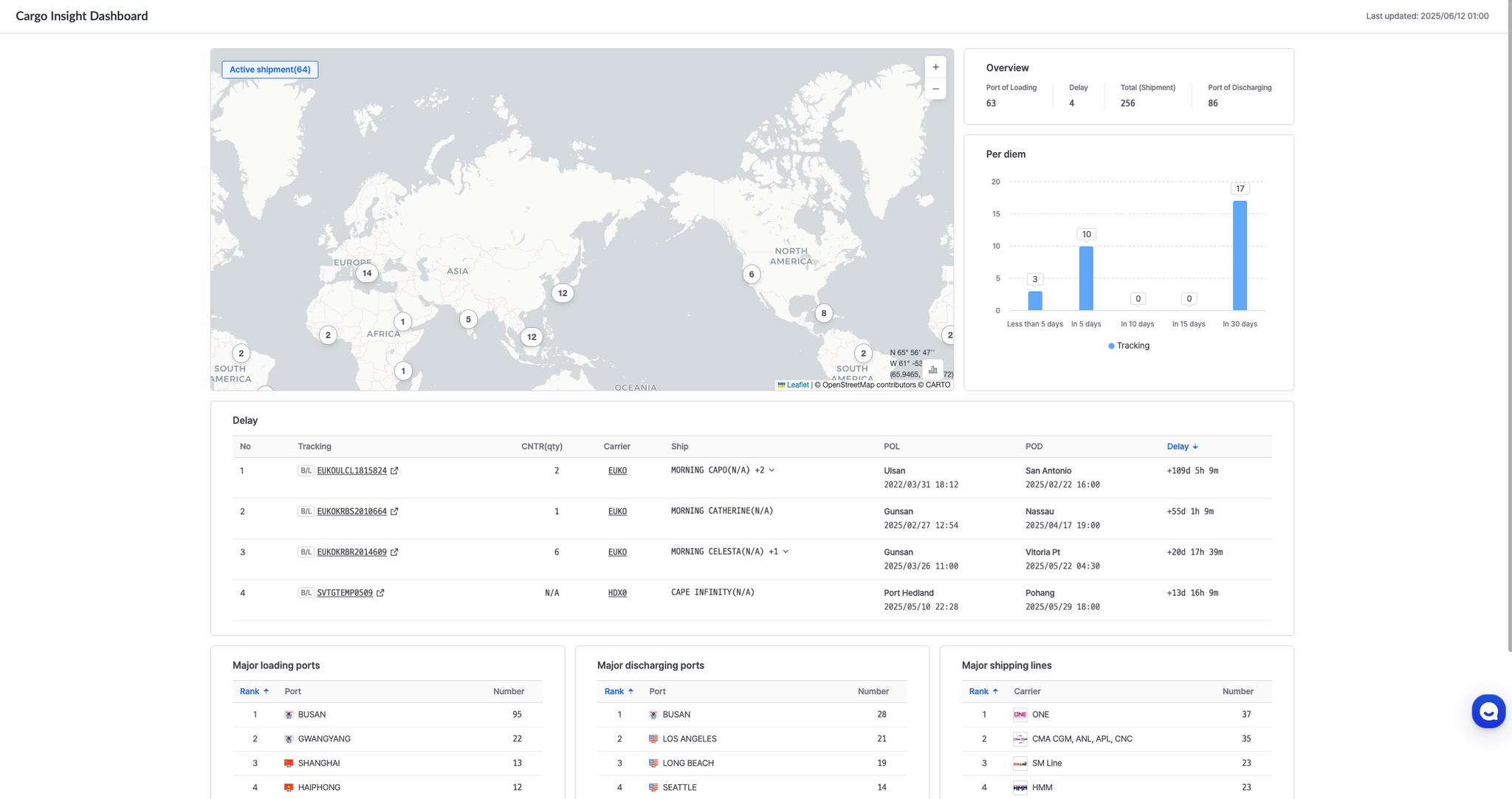
Cargo Insight Dashboard는 주요 선사, 터미널, 항구의 컨테이너 상황을 한눈에 확인하실 수 있습니다.
Map
지도상에서 항구별 운송 컨테이너 선적 현황 정보를 제공합니다.
이를 통해 화물이 어느 항구에 집중되어 있는지 확인할 수 있으며, 정보는 15분 마다 자동 업데이트됩니다.
•
Active Shipment : POD(양하지) 기준으로 각 항구에 도착 예정 또는 최근 도착한 총 컨테이너 수를 표시합니다.
•
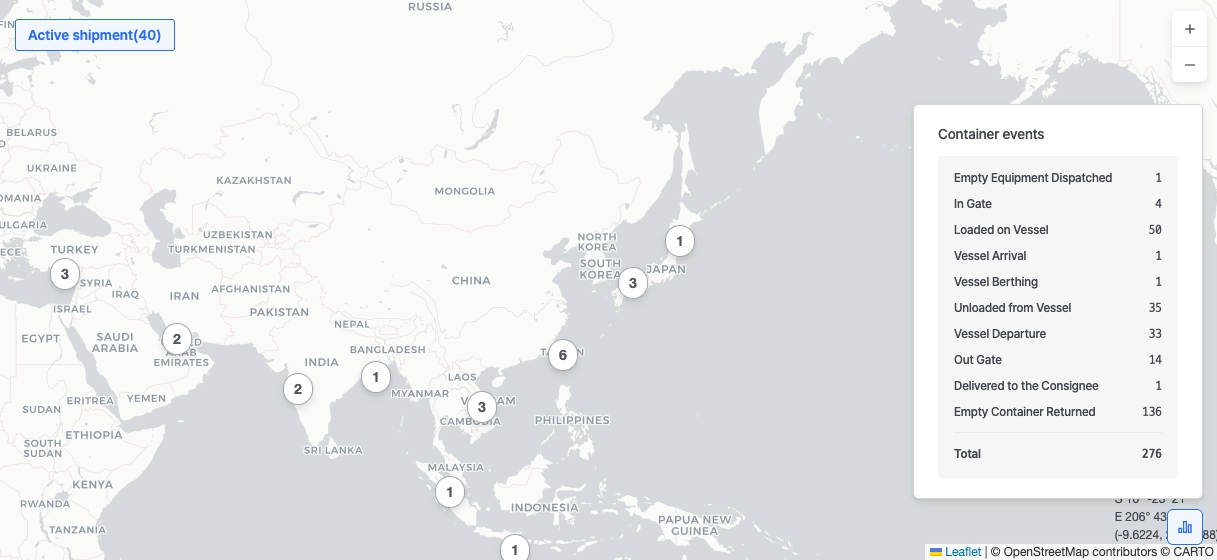
Container Events : 우측 하단의 차트 아이콘을 클릭하면, 이벤트별 컨테이너 수를 표시합니다.
•
지도 위에 있는 원형 마커를 클릭 시 항구별 컨테이너 수를 확인할 수 있습니다.
Overview
Overview 섹션은 현재 연도에 등록한 선적 데이터를 기반으로 실시간 선적 현황 정보를 제공합니다.
•
Port of Loading (POL) : 선적지 항구 수
•
Delay : 도착 지연이 발생하는 선적 수
•
Total (Shipment) : 등록된 총 선적 수
•
Port of Discharging (POD) : 양하지 항구 수

Per Diem
Per Diem 차트는 Port of Discharge (POD)에서 컨테이너 반출이 발생하기 전까지 주요 도착 이벤트 발생 후 경과 일수에 따른 컨테이너 수를 제공합니다.
차트는 15일 이내, 30일 이내 등 구간별 컨테이너 수를 집계하며, 터미널 체류 현황을 효율적으로 파악할 수 있도록 지원합니다.

팁: 막대그래프를 클릭하면 해당 구간에 포함된 선적에 대한 상세정보를 확인할 수 있습니다.
이를 통해 체류 중인 컨테이너를 빠르게 파악할 수 있습니다.

Delay
Delay 섹션은 ETA(예상 도착 시간)보다 지연 발생 선적 리스트 정보를 제공합니다.
이를 통해 실시간으로 도착 지연 중인 선적을 빠르게 파악할 수 있습니다.

팁: B/L, CNTR, BKG 클릭 시 선적 운송에 대한 상세 정보를 확인하실 수 있습니다.

Major Loading Ports
현재 연도에 등록된 선적 데이터를 기준으로, 선적지(POL, Port of Loading)별 선적 수를 집계하여 선적지 기준 상위 10개 항구를 표시합니다.
이를 통해 가장 활발하게 운송이 이루어지는 출발 포트를 한눈에 파악할 수 있습니다.

Major Discharging Ports
현재 연도에 등록된 선적 데이터를 기준으로, 하역지(POD, Port of Discharge)별 선적 수를 집계하여 하역지 기준 상위 10개 항구를 표시합니다.
이를 통해 가장 활발하게 운송이 이루어지는 도착 포트를 한눈에 파악할 수 있습니다.

Major Shipping Lines
현재 연도에 등록된 선적 데이터를 기준으로, 선사별 선적 수를 집계하여 상위 10개의 선사를 표시합니다.
이를 통해 선적량이 많은 주요 선사를 직관적으로 파악할 수 있습니다.

Map
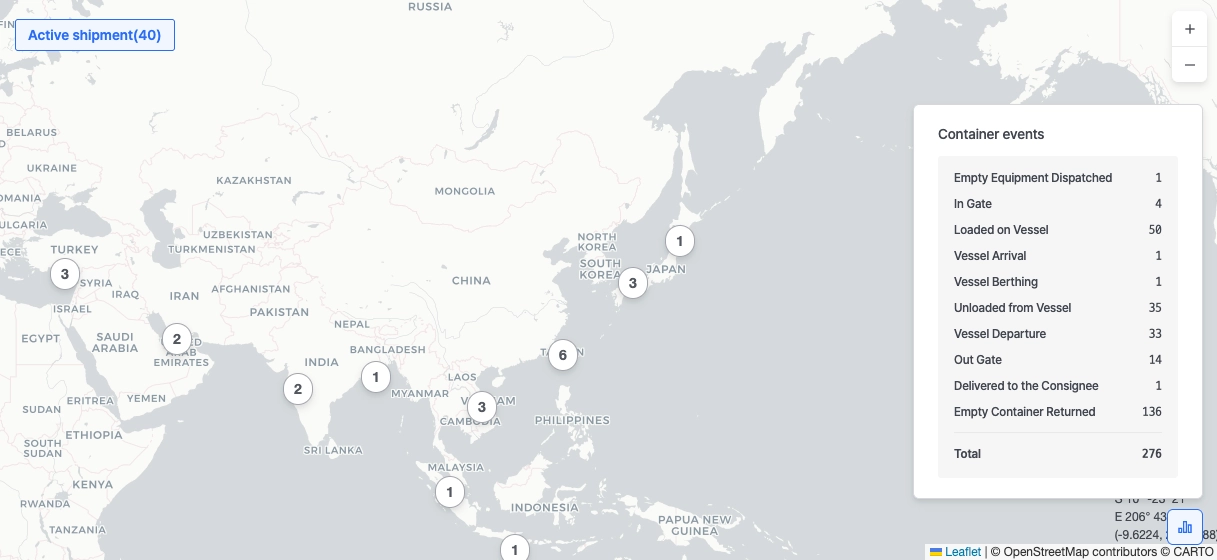
The map provides a visual summary of active container shipments by port location, updated every 15 minutes.
It displays shipments that meet the following conditions:
•
Registered within the last 3 months
•
B/L status is one of: Before, On or End
•
ATA at Port of Discharge (POD) is within 45 days
•
Included in the container count per port
Active Shipment
This section displays the total number of ports with active shipments, meeting the following conditions:
•
Registered within the last 3 months
•
B/L status is one of: Before, On or End
•
ATA at Port of Discharge (POD) is within 45 days
•
Included in the container count per port
It provides a real-time overview of how many ports currently have active or recently completed shipment activity.
Clustered Markers
•
When multiple containers are located close together, they are automatically grouped into a cluster marker.
•
Each numbered circle indicates the number of containers at or near a specific location.
•
When you click on a particular cluster marker, you can check the total number of containers that meet the search conditions for each port of loading.
Container Events
•
Click the chart icon at the bottom right corner of the map to view how many shipments are currently in each event stage.
•
Included Shipments
◦
Registered within the last 3 months
◦
B/L status is Before, On or End
•
Event Selection Logic
◦
If the highest event is RD (Empty Container Returned):
▪
Shipment is included for 30 days after the RD code is generated
◦
If there is no RD event:
▪
Shipment is included for 45 days from the Port of Discharge ATA (Actual Time of Arrival)
Overview
The Overview section provides a real-time summary of shipment activity based on data registered in the current year (excluding entries marked as Not Found). Key metrics include:
•
Port of Loading (POL): Number of distinct ports where shipments were loaded.
•
Delays: Total number of shipments experience delays, currently listed in the Delay table.
•
Total (Shipment): Total number of shipments registered in the current year.
•
Port of Discharging (POD): Number of distinct ports where shipments are scheduled to be unloaded.

Per Diem
The Per Diem chart displays the number of containers that have remained at the Port of Discharge (POD) for a certain number of days after key arrival events—but before Gate Out occurs.
 How it works:
•
The system tracks the time elapsed from the most recent of these container events:
◦
Vessel Arrival
◦
Vessel Berthing
◦
Unloaded from Vessel
•
The countdown ends once Gate Out is completed.
•
Containers are grouped into time clusters (e.g., Less than 5 days, In 5 days, In 15 days, etc.).
 Notes:
•
If all three events (Vessel Arrival, Berthing, Unloading) are recorded, the latest timestamp is used as the starting point.
•
Containers with no Gate Out event after 30 days are excluded from the chart.

Delay
The Delay section in the Cargo Dashboard provides a real-time overview of active shipments that have passed their ETA but have not yet been unloaded. Each entry includes key shipment details and delay-related information, such as:
•
B/L, Booking, and Container Number
•
Number of Containers
•
Carrier
•
Involved Ship
•
Port of Loading (POL) and Port of Discharge (POD)
•
Delay Duration (in days)

Major Loading Ports
The Major Loading Ports section presents the top 10 ports of loading (POL) based on real-time shipment data registered in the current year, ranked by shipment frequency.
It helps users quickly identify the busiest loading ports across ongoing operations.

Major Discharging Ports
The Major Discharging Ports section highlights the top 10 ports of discharge (POD), ranked by unloading frequency, based on real-time shipment data registered in the current year.
It provides insights into the busiest discharge locations and helps users understand port usage trends across carriers.

Major Shipping Lines
The Major Shipping Lines section provides insights into carrier performance, helping you monitor freight volumes and identify potential delays for more efficient shipment management.
Based on real-time shipment data registered in the current year, it displays the top 10 booking carriers, ranked by total number of shipments.
