




선박 팝업은 선박에 대한 상세 정보를 확인하고 다양한 기능을 활용할 수 있습니다.
Ship & Route Summary

번호(No.) | 선박 정보 항목 (Ship Information) | 설명 (Description) |
 | Nation Code | 선박이 등록된 국가를 나타내는 국가 코드입니다. |
 | Ship Name | 선박의 공식 등록 명칭입니다. |
 | Ship Type | 선박의 종류(예: Container, Bulk Carrier 등)를 나타냅니다. |
 | Ship Type By Size | 선박의 크기를 기준으로 분류된 세부 선종입니다. |
 | IMO Number | 국제해사기구(IMO)에 등록된 고유 선박 번호입니다. |
 | Call Sign | 선박의 무선통신 및 추적을 위한 고유 식별 부호입니다. |
 | MMSI | 선박 고유 식별 번호로, AIS 신호 전송 시 사용되는 9자리 숫자입니다. |
[운항 중인 선박 상태]
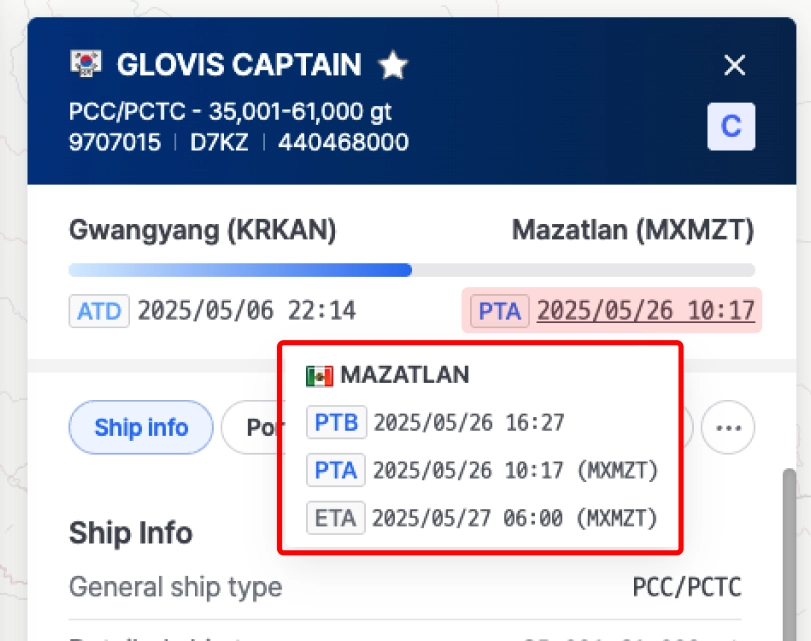
Ship Insight 선박 팝업에서는 다음 목적지에 대해 도착 및 접안 시간을 확인할 수 있습니다.
•
ETA (Estimated Time of Arrival): 선박의 AIS 장비에서 제공
•
PTA (Predicted Time of Arrival): 씨벤티지 자체 AI 모델로 예측된 도착 시각
•
PTB (Predicted Time of Berthing): 접안 예정 시각 예측 (씨벤티지 기준)

PTA와 PTB는 씨벤티지가 생성한 MTN (Maritime Traffic Network)을 기반으로 계산되며, 이 MTN은 과거 AIS 데이터를 기반으로 구축된 네트워크입니다.
PTA와 PTB는 ETA보다 약 80% 이상 정교하기 때문에 지연에 대한 예측이 가능합니다
[정박 중인 선박 상태]

선박이 항구에 정박 중인 상태를 확인할 수 있습니다.
•
ATA (Actual Time of Arrival) : AIS 데이터를 기반으로 제공하는 선박의 실제 도착 시간입니다.
•
ATB (Actual Time of Berth) : AIS 데이터를 기반으로 제공하는 선박의 실제 접안 시간입니다.
Ship Info
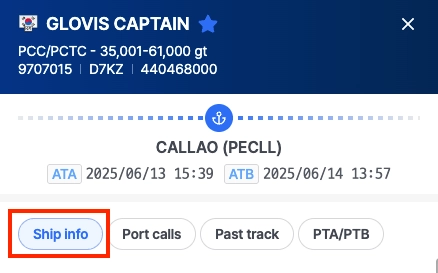
Ship Info에서는 선종, 사이즈, AIS 수신 정보 등의 주요 상세 정보를 제공합니다.
[Ship Info]
선박 정보 항목 (Ship Information) | 설명 (Description) |
General Ship Type | 선종 (예: Container Ship, Tanker, Bulk Carrier) See ship type by size |
Detailed Ship Type | 선종/사이즈 (예: ULCV, Neo-Panamax) See ship type by size |
Gross Tonnage (GT) | 선박의 총 내부 용량(톤) |
Deadweight Tonnage (DWT) | 선박이 운반할 수 있는 최대 중량 (화물, 연료, 승무원, 식량 포함) |
TEU Capacity | 선박이 운반할 수 있는 최대 20피트 컨테이너(TEU) 수 |
Length | 선박의 전체 길이 (미터 단위) |
Width (Beam) | 선박의 가장 넓은 지점에서의 최대 폭 |
Depth | 전체 깊이 |
Max Draught | 최대 흘수 |
Built Year | 건조 년도 |
[AIS Info]
AIS Info | 설명 (Description) |
Last AIS Update | 위치 정보 수신 시각 |
Navigation Status | 선박의 현재 운항 상태 (예: Underway Using Engine, Moored, Anchored) Navigation Status |
Latitude & Longitude | 위도/경도 |
Heading | 선박이 향하고 있는 방향(도 단위) |
Course | 선박이 실제 지면을 따라 이동하는 경로 |
Speed | 선박 속도 |
Draft | 선박의 선체가 물속에 잠긴 깊이 (적재 상태에 따라 달라질 수 있음) |
Port Calls
•
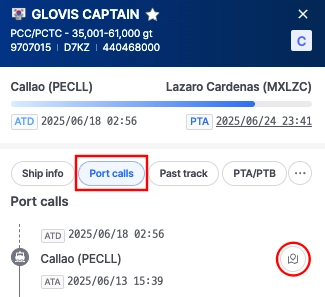
최근 6개월 간 선박 포트콜을 조회할 수 있습니다.
•
포트콜의 우측 아이콘 클릭 시 해당 항차의 항적을 지도에서 확인할 수 있습니다.
Past Track
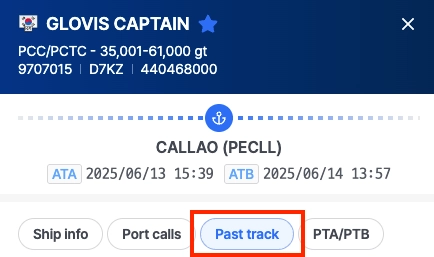
선박의 과거 이동 경로를 기간별로 확인할 수 있는 기능을 제공합니다.
참고 사항: 기본적으로 60일간의 과거 항적 데이터를 제공하며, 계약 조건에 따라 조회 기간이 조정될 수 있습니다.
[Past Track 조회 방법]
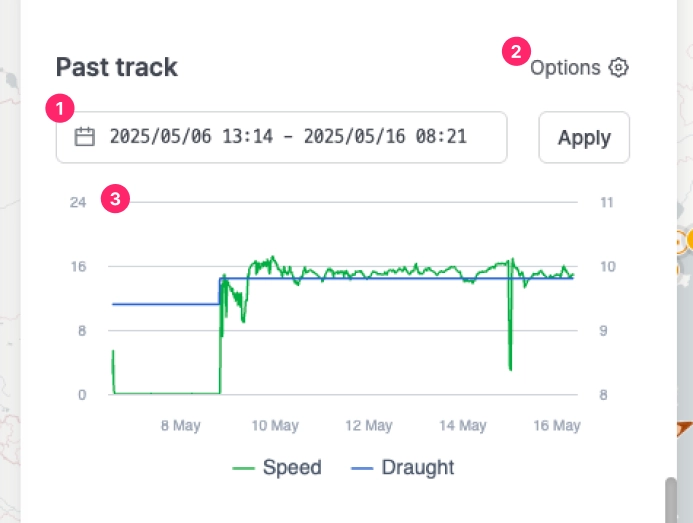 항적 기간 설정
•
항적을 조회할 시작일과 종료일을 선택합니다.
•
설정 완료 후 [Apply] 버튼을 클릭하면 해당 기간의 항적을 조회할 수 있습니다.
옵션 설정
•
Options 버튼을 클릭하여 조회 옵션을 설정할 수 있습니다:
◦
Line: 항적을 선으로 표시
◦
Marker: 위치별 마커 표시
◦
Label: 타임스탬프 라벨 표시 — AIS 데이터가 수신된 시간 정보를 표시합니다.
◦
Navigation Color: 항적의 색상 (예: #bd1153)
선박 속도 및 흘수 그래프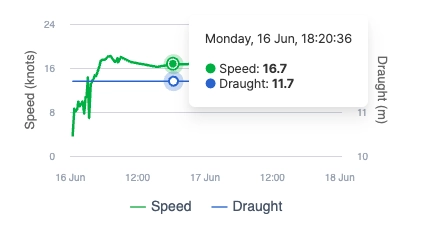
•
조회 기간에 대한 선박의 속도(Speed) 또는 흘수(Draught)를 확인할 수 있습니다.
•
그래프 상에 마우스 커서를 올리면 해당 시점의 선박의 위치가 지도에 표시됩니다.
PTA / PTB (라우팅 기능)
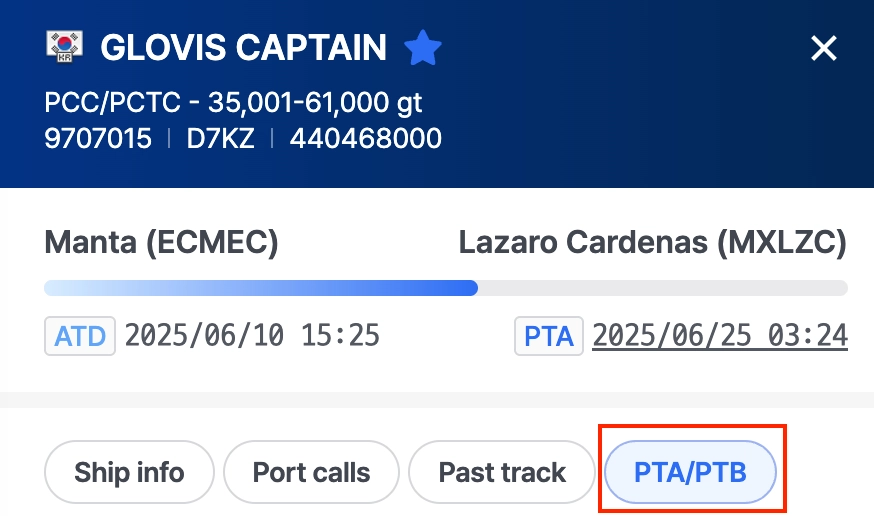
목적지 항구를 설정하여 라우팅 및 예측 도착 시간을 학인할 수 있습니다.
[PTA / PTB 조회 방법]
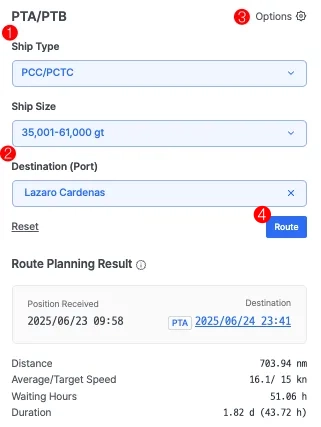 Ship Type / Ship Size 설정
•
현재 조회 중인 선박의 정보에 따라 Ship Type과 Ship Size는 자동으로 설정됩니다.
목적지 설정•
선박의 선종 및 사이즈에 따라 목적지 항구 리스트가 자동으로 필터링되며, 해당 목록 중에서 목적지를 선택해야 합니다.
옵션 설정•
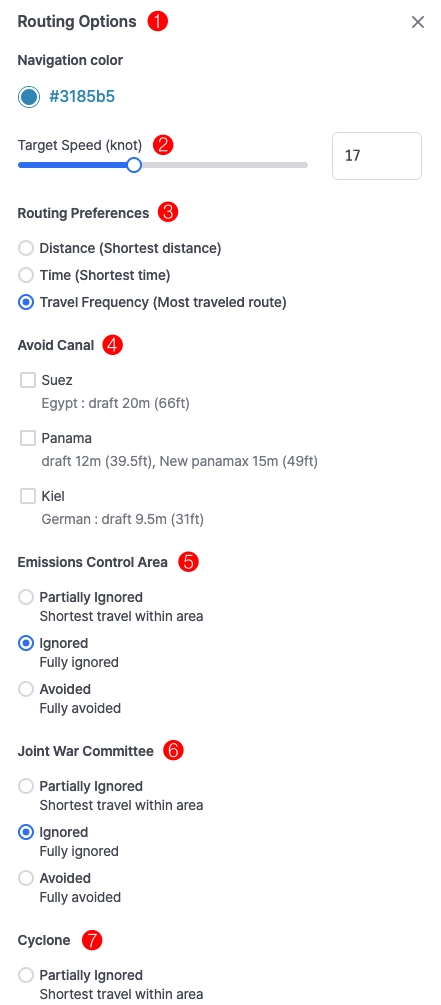
옵션을 클릭하여 경로 설정 창을 열고, 속도, 운하 회피, ECA 설정 등 세부 라우팅 설정을 입력합니다.
•
옵션별 설명
번호 (No.) | Routing Option | 설명 (Description) | Options |
| Navigation Color | 지도상 조회되는 항로의 색상을 설정합니다. | Hex 색상 선택기 |
| Target Speed (knots) | 선박 속도를 설정합니다. | 5 - 35 knots |
| Routing Preferences | Routing 설정 시 항로 계획에 사용할 기준을 설정합니다. | • Distance (Shortest distance): 최단 거리
• Time (Shortest time): 최소 시간
• Travel Frequency (Most traveled route): 최대 빈도 |
| Avoid Canal | 특정 운하를 경로에서 회피하도록 설정합니다. | • Suez
• Panama
• Kiel |
| Emission Control Areas (ECA) | Routing 설정 시 ECA(배출 규제 구역)에 대해 설정합니다. | • Partially Ignored (Shortest travel within the area) : 일부 회피
• Ignored : 회피
• Avoided : 완전 회피 |
| Joint War Committee | Routing 설정 시 ECA(배출 규제 구역)에 대해 설정합니다. | • Partially Ignored (Shortest travel within the area) : 일부 회피
• Ignored : 회피
• Avoided : 완전 회피 |
| | Cyclone | Routing 설정 시 태풍 발생 영역에 대해 설정합니다. | • Partially Ignored (Shortest travel within the area) : 일부 회피
• Ignored : 회피
• Avoided : 완전 회피 |
PTA / PTB 조회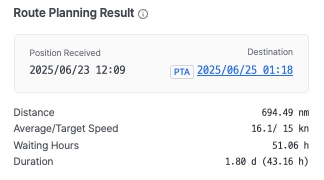
•
라우팅 설정이 완료되면 [Route] 버튼을 클릭하여 예상 항로를 계산하고, PTA (Predicted Time of Arrival) 및 PTB (Predicted Time of Berthing)을 확인합니다.
•
설정한 목적지까지의 ETA (Estimated Time of Arrival), 총 거리 (Distance), 평균/목표 속도 (Average/Target Speed), 대기 시간 (Waiting Hours), 총 소요 시간 (Duration) 등 라우팅에 대한 상세 정보를 조회할 수 있습니다.
부록 APPENDIX
Ship Type by Size
Bulk Carrier
Classification Code | Classification | Lower Range (DWT) | Higher Range (DWT) |
BULK 05 | Handysize | 0 | 34,999 |
BULK 04 | Handymax | 35,000 | 59,999 |
BULK 03 | Panamax | 60,000 | 79,999 |
BULK 02 | Capesize | 80,000 | 179,999 |
BULK 01 | VLBC | 180,000 |
Cargo
Classification Code | Classification | Lower Range (DWT) | Higher Range (DWT) |
CARGO 04 | General Cargo | 0 | 2,999 |
CARGO 03 | General Cargo | 3,000 | 7,499 |
CARGO 02 | General Cargo | 7,500 | 37,999 |
CARGO 01 | General Cargo | 38,000 |
Container
Classification Code | Classification | Lower Range (TEU) | Higher Range (TEU) |
CONTAINER 07 | Small Feeder | 0 | 1,000 |
CONTAINER 06 | Feeder Containership | 1,001 | 2,000 |
CONTAINER 05 | Feedermax Containership | 2,001 | 3,000 |
CONTAINER 04 | Panamax Containership | 3,001 | 5,100 |
CONTAINER 03 | Post-Panamax Containership | 5,101 | 10,000 |
CONTAINER 02 | Neo-Panamax Containership | 10,001 | 14,500 |
CONTAINER 01 | ULCV Containership | 14,501 |
LNG
Classification Code | Classification | Lower Range (Gross Tonnes) | Higher Range (Gross Tonnes) |
LNG 03 | LNG Gas Carrier | 0 | 73,000 |
LNG 02 | LNG Gas Carrier | 73,001 | 147,000 |
LNG 01 | LNG Gas Carrier | 147,001 |
LPG
Classification Code | Classification | Lower Range (Gross Tonnes) | Higher Range (Gross Tonnes) |
LPG 03 | LPG Gas Carrier | 0 | 4,500 |
LPG 02 | LPG Gas Carrier | 4,501 | 26,000 |
LPG 01 | LPG Gas Carrier | 26,001 |
Pure Car Carrier (PCC)
Classification Code | Classification | Lower Range (Gross Tonnes) | Higher Range (Gross Tonnes) |
PCC 03 | PCC/PCTC | 0 | 35,000 |
PCC 02 | PCC/PCTC | 35,001 | 61,000 |
PCC 01 | PCC/PCTC | 61,001 |
Ro-ro
Classification Code | Classification | Lower Range (Gross Tonnes) | Higher Range (Gross Tonnes) |
RORO 03 | Ro-ro Cargo | 0 | 0 |
RORO 02 | Ro-ro Cargo | 8,501 | 48,000 |
RORO 01 | Ro-ro Cargo | 48,001 |
Tanker
Classification Code | Vessel Type | Classification |
TANKER 05 | Crude Oil Tanker | Tanker- Panamax |
TANKER 04 | Crude Oil Tanker | Tanker- Aframax |
TANKER 03 | Crude Oil Tanker | Tanker- Suezmax |
TANKER 02 | Crude Oil Tanker | Tanker- VLCC |
TANKER 01 | Crude Oil Tanker | Tanker- ULCC |
Product Tanker
Classification | Vessel Type |
PRODUCT_TANKER01 | Product Tanker |
Chemical Tanker
Classification | Vessel Type | Classification |
CHEMICAL_TANKER01 | Product Tanker | Chemical tanker, combined chemical and oil tanker |
Tug
Classification | Vessel Type |
TUG01 | Tug |
FPSO
Classification | Vessel Type | Classification |
FPSO01 | FPSO | Floating drilling production tanker, floating gas production, floating gas storage, floating LNG production and storage FLNG, floating power station, floating production tanker, floating storage tanker |
ETC
Classification | Vessel Type |
ETC01 | ETC All |
AIS Navigation Status Description
코드 | 상태값 | 상세설명 |
0 | 엔진 사용 중 (Under way using engine) | 선박이 엔진을 사용하여 이동 중인 상태를 나타냅니다. |
1 | 닻을 내리고 정박 중 (At anchor) | 선박이 닻을 내리고 정박해 있는 상태를 나타냅니다. 이동 하지 않고 고정된 상태입니다. |
2 | 지휘 불능 (Not under command) | 선박이 고장 등으로 인해 조종할 수 없는 상태를 나타냅니 다. 다른 선박들이 주의를 기울여야 합니다. |
3 | 조종 제한 (Restricted maneuverability) | 선박이 작업이나 기상 조건 등으로 인해 조종 능력이 제한 된 상태를 나타냅니다. 이 상태에서는 다른 선박들이 주의 를 기울여야 합니다. |
4 | 흡수로 인해 제약을 받는 상태 (Constrained by her draught) | 선박이 흘수(깊이)에 의해 항로 선택이 제한된 상태를 나 타냅니다. |
5 | 계류 중 (Moored) | 선박이 계류 로프 등으로 고정되어 있는 상태를 나타냅니 다. 항구나 부두에 묶여 있는 상태입니다. |
6 | 좌초 (Aground) | 선박이 얕은 물에 걸려 움직이지 못하는 상태를 나타냅니다. 좌초된 상태입니다. |
7 | 어업에 종사 중 (Engaged in fishing) | 선박이 어업 활동 중인 상태를 나타냅니다. 이 상태에서는어망이나 기타 어업 장비가 사용 중일 수 있습니다. |
8 | 항해 중 (Under way sailing) | 선박이 항해 중인 상태를 나타냅니다. 엔진이 아닌 돛을 사용하여 이동할 수도 있습니다. |
9 | 위험물, 유해 물질 또는 해양 오염 물질을 운반하는 선박의 미래 항해 상태 예약 (Reserved for future amendment) | 이 값은 미래의 특정 항해 상태를 나타내기 위해 예약되어있습니다. |
10 | 위험물, 유해 물질 또는 해양 오염 물질을 운반하는 선박의 미래 항해 상태 예약 (Reserved for future amendment) | 이 값도 미래의 특정 항해 상태를 나타내기 위해 예약되어있습니다. |
11 | 선미를 끄는 동력선 (지역 사용) (Power-driven vessel towing astern) | 선박이 다른 선박을 선미로 끌고 있는 상태를 나타냅니다.주로 예인선이 해당됩니다. |
12 | 앞쪽을 미는 동력선 또는 옆에서 끄는 동력선 (지역 사용) (Power-driven vessel pushing ahead or towing alongside) | 선박이 다른 선박을 앞쪽에서 밀거나 옆에서 끌고 있는 상태를 나타냅니다. |
13 | 미래 사용을 위해 예약됨 (Reserved for future use) | 이 값은 미래에 특정 상태를 추가하기 위해 예약되어 있습니다. |
14 | AIS-SART (활성화됨), MOB-AIS, EPIRB-AIS (AIS-SART (active), MOB-AIS, EPIRB-AIS) | 이 값은 AIS-SART(수색 및 구조 트랜스폰더), MOB-AIS(사람 추락 경보 시스템), EPIRB-AIS(위치 표시 비상라디오 비콘) 장치가 활성화된 상태를 나타냅니다. |
15 | 정의되지 않음 = 기본값 (Undefined = default) | 선박의 상태가 정의되지 않은 기본 상태를 나타냅니다. |
The Ship Pop-Up provides a detailed snapshot of a vessel’s journey—including its ship & route summary, ship information, port calls, past track, and PTA/PTB-based route planning.
Ship & Route Summary
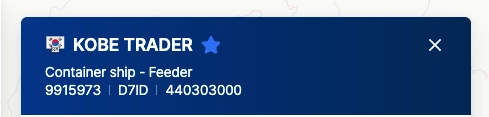
No. | Ship Information | Description |
| Nation Code | The country code indicating the vessel’s country of registration (flag state) |
| Ship Name | The official name of the vessel, used for identification. |
| General Ship Type | Broad classification of the vessel |
| Detailed Ship Type | Specific vessel category based on size, purpose, or design |
| IMO Number | A unique seven-digit number assigned to the vessel by the International Maritime Organization for identification |
| Call Sign | A unique radio identifier for communication and tracking purposes |
| | MMSI | Maritime Mobile Service Identity; a unique 9-digit number used in ship-to-ship and ship-to-shore communication systems |
[In Transit Vessel]
In the vessel pop-up window, you can view multiple arrival time estimates by hovering over the underlined PTA:


•
PTB (Predicted Time of Berthing) – The expected time a vessel will berth, calculated using SeaVantage’s predictive analytics.
•
PTA (Predicted Time of Arrival) – The forecasted arrival time, determined through SeaVantage’s proprietary data and analytics.
•
ETA (Estimated Time of Arrival) – The expected arrival time, as transmitted by the vessel’s AIS equipment.
PTA (Predicted Time of Arrival) and PTB (Predicted Time of Berthing) are over 80% accurate compared to ETA, providing reliable predictions for potential delays.
[Arrived/Docked Vessel]
You can check in real time whether a vessel is currently docked at its destination port.

•
ATA (Actual Time of Arrival) – The real-time arrival of a vessel at the port, based on AIS data.
•
ATB (Actual Time of Berth) – The vessel's actual berthing time as recorded through AIS data.
Ship Info
•
The Ship Info section provides key details about a vessel, including its type, capacity, dimensions, and current navigational data.
Ship Info | Description |
General Ship Type | The broad category of the vessel (e.g., Container Ship, Tanker, Bulk Carrier). See ship type by size |
Detailed Ship Type | A more specific classification (e.g., Neo-Panamax, Ultra Large Container Vessel). See ship type by size |
Gross Tonnage (GT) | The total internal volume of the ship, measured in tons. |
Deadweight Tonnage (DWT) | The maximum weight the ship can carry, including cargo, fuel, crew, and provisions. |
TEU Capacity | The maximum number of Twenty-foot Equivalent Units (TEUs) the vessel can transport. |
Length | The overall length of the ship, measured in meters. |
Width (Beam) | The maximum width of the ship at its widest point. |
Depth | The vertical distance from the ship’s bottom to the main deck. |
Max Draught | The maximum depth the ship's hull reaches underwater when fully loaded. |
Built Year | The year the vessel was constructed. |
AIS Info | Description |
Last AIS Update | The timestamp of the most recent AIS signal received. |
Navigation Status | The vessel's current operational status (e.g., Underway Using Engine, Moored, Anchored). |
Latitude & Longitude (WGS84) | The ship’s precise location coordinates. |
Heading | The direction in which the vessel's bow is pointing, measured in degrees. |
Course | The actual direction the ship is moving over ground. |
Speed | The vessel's current speed in knots. |
Draft | The current depth of the vessel’s hull submerged underwater, which may vary based on load conditions. |
Port Calls
•
View vessel port calls from the past 6 months.

Past Track
[Past Track]
•
In the Past Track menu, you can view a vessel's historical route by selecting a specific time period:
◦
Choose the desired time period for your search.
◦
Click the ‘Apply’ button to display the historical track.

•
Additionally, by clicking the ‘Options’ button, you can:
◦
Display timestamps along the route.
◦
Change the navigation color for better visibility.

[Speed and Draught Information]
•
In the Past Track menu, you can view the speed and draught values for the selected time period.
◦
Hover your mouse over the graph to see specific data points.
◦
The corresponding section of the vessel’s track will be highlighted on the map for better visualization.

PTA/PTB
In the PTA/PTB menu, you can set the vessel’s route plan based on specific parameters.
•
Select the vessel type, size, and destination port.
•
Click the ‘Route’ button to display the vessel’s predicted path and estimated arrival time from its current location to the destination.

•
When configuring routing preferences, you can customize parameters to reflect realistic navigation conditions, including:
◦
Speed settings
◦
Preferred routes
◦
Restrictions based on environmental or geopolitical factors
•
These settings help optimize route planning and provide more accurate arrival predictions.

Ship Type by Size
Bulk Carrier
Classification Code | Classification | Lower Range (DWT) | Higher Range (DWT) |
BULK 05 | Handysize | 0 | 34,999 |
BULK 04 | Handymax | 35,000 | 59,999 |
BULK 03 | Panamax | 60,000 | 79,999 |
BULK 02 | Capesize | 80,000 | 179,999 |
BULK 01 | VLBC | 180,000 |
Cargo
Classification Code | Classification | Lower Range (DWT) | Higher Range (DWT) |
CARGO 04 | General Cargo | 0 | 2,999 |
CARGO 03 | General Cargo | 3,000 | 7,499 |
CARGO 02 | General Cargo | 7,500 | 37,999 |
CARGO 01 | General Cargo | 38,000 |
Container
Classification Code | Classification | Lower Range (TEU) | Higher Range (TEU) |
CONTAINER 07 | Small Feeder | 0 | 1,000 |
CONTAINER 06 | Feeder Containership | 1,001 | 2,000 |
CONTAINER 05 | Feedermax Containership | 2,001 | 3,000 |
CONTAINER 04 | Panamax Containership | 3,001 | 5,100 |
CONTAINER 03 | Post-Panamax Containership | 5,101 | 10,000 |
CONTAINER 02 | Neo-Panamax Containership | 10,001 | 14,500 |
CONTAINER 01 | ULCV Containership | 14,501 |
LNG
Classification Code | Classification | Lower Range (Gross Tonnes) | Higher Range (Gross Tonnes) |
LNG 03 | LNG Gas Carrier | 0 | 73,000 |
LNG 02 | LNG Gas Carrier | 73,001 | 147,000 |
LNG 01 | LNG Gas Carrier | 147,001 |
LPG
Classification Code | Classification | Lower Range (Gross Tonnes) | Higher Range (Gross Tonnes) |
LPG 03 | LPG Gas Carrier | 0 | 4,500 |
LPG 02 | LPG Gas Carrier | 4,501 | 26,000 |
LPG 01 | LPG Gas Carrier | 26,001 |
Pure Car Carrier (PCC)
Classification Code | Classification | Lower Range (Gross Tonnes) | Higher Range (Gross Tonnes) |
PCC 03 | PCC/PCTC | 0 | 35,000 |
PCC 02 | PCC/PCTC | 35,001 | 61,000 |
PCC 01 | PCC/PCTC | 61,001 |
Ro-ro
Classification Code | Classification | Lower Range (Gross Tonnes) | Higher Range (Gross Tonnes) |
RORO 03 | Ro-ro Cargo | 0 | 0 |
RORO 02 | Ro-ro Cargo | 8,501 | 48,000 |
RORO 01 | Ro-ro Cargo | 48,001 |
Tanker
Classification Code | Vessel Type | Classification |
TANKER 05 | Crude Oil Tanker | Tanker- Panamax |
TANKER 04 | Crude Oil Tanker | Tanker- Aframax |
TANKER 03 | Crude Oil Tanker | Tanker- Suezmax |
TANKER 02 | Crude Oil Tanker | Tanker- VLCC |
TANKER 01 | Crude Oil Tanker | Tanker- ULCC |
Product Tanker
Classification | Vessel Type |
PRODUCT_TANKER01 | Product Tanker |
Chemical Tanker
Classification | Vessel Type | Classification |
CHEMICAL_TANKER01 | Product Tanker | Chemical tanker, combined chemical and oil tanker |
Tug
Classification | Vessel Type |
TUG01 | Tug |
FPSO
Classification | Vessel Type | Classification |
FPSO01 | FPSO | Floating drilling production tanker, floating gas production, floating gas storage, floating LNG production and storage FLNG, floating power station, floating production tanker, floating storage tanker |
ETC
Classification | Vessel Type |
ETC01 | ETC All |
Routing Option | Description | Options |
Navigation Color | Select the color of the predicted route line shown on the map. | Hex color selector |
Target Speed (knots) | Set the vessel’s target sailing speed. | 5 to 35 knots |
Routing Preferences | Choose the routing logic for path calculation. | • Distance (Shortest distance): 최단 거리
• Time (Shortest time): 최소 시간
• Travel Frequency (Most traveled route): 경로 중 선택 |
Avoid Canal | Exclude specific canals from the predicted route. | • Suez
• Panama
• Kiel |
Emission Control Areas (ECA) | Set how ECAs are treated during route planning. | • Partially Ignored (Shortest travel within the area)
• Ignored
• Avoided |
Joint War Committee | Configure routing through areas designated by the Joint War Committee. | • Partially Ignored (Shortest travel within the area)
• Ignored
• Avoided |
Cyclone | Define how cyclone-affected areas are handled. | • Partially Ignored (Shortest travel within the area)
• Ignored
• Avoided |
Ship Type (1) and Ship Size (2) are automatically filled based on the vessel currently being viewed. Select a destination (3).The list of available ports will be filtered according to the selected ship type and size.
Click on “Options” (4) to open the routing settings and customize preferences (e.g., speed, canal avoidance, ECA settings). Once all settings are selected, click the “Route” button to calculate the predicted path and view the PTA (Predicted Time of Arrival) and PTB (Predicted Time of Berthing).CII 항목 (CII Information) | 설명 (Description) | 단위 (Unit) |
AER | Annual Efficiency Ratio – CO₂ emissions per unit of transport work | g CO₂ / dwt·nm |
CO₂ | Total carbon dioxide emitted by the vessel over the period measured | metric tons (t) |
FOC | Fuel Oil Consumption – Total amount of fuel consumed | metric tons (t) |
CF | Conversion Factor – Multiplier used to convert fuel consumption into CO₂ emissions | metric tons (t) |
Capacity | Deadweight tonnage (DWT) used as a measure of transport capacity | metric tons (t) |
Distance | Total distance traveled by the vessel during the reporting period | (nautical miles) |